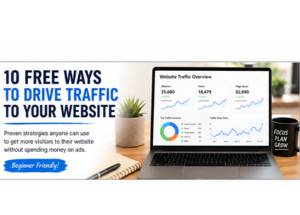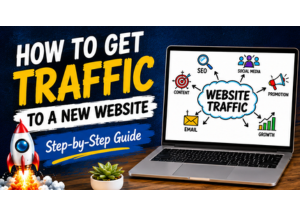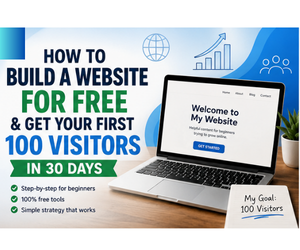
If you’re looking for a way to build a website for free and get traffic, you’re not alone.
Every day, thousands of people create websites hoping to attract visitors, grow an audience, and maybe even earn money online. The problem is that most beginners focus on building the website but never learn how to get people to visit it.
That’s why this guide is different.
I’m going to show you exactly how to build a website for free and get traffic, even if you’re starting from scratch with no technical experience. You’ll learn how to create your website, publish the right content, and take the first steps toward getting your first 100 visitors.
Let’s start with the most important thing many beginners get wrong.
The Biggest Mistake New Website Owners Make

When I first started building websites, I wasted days doing things that didn’t matter.
I changed colors.
I changed fonts.
I tried dozens of themes.
I moved buttons around.
I kept thinking:
“If I can just make my website look perfect, people will come.”
They didn’t.
What I eventually learned was this:
People don’t visit websites because of the colors.
They visit because the website solves a problem.
Google doesn’t rank websites because they have fancy logos.
Google ranks websites because they answer questions better than other websites.
Looking back, I would have spent less time designing and more time creating helpful content.
That’s one of the biggest lessons I can share with beginners.
Your first website doesn’t need to be perfect.
It just needs to be useful.
How to Build a Website for Free and Get Traffic in 2026
Some people say websites are dead.
Others claim social media is all you need.
I don’t agree.
Social media platforms can change overnight.
Accounts can get suspended.
Algorithms can change.
Followers can disappear.
Your website is different.
You own it.
You control the content.
You decide what gets published.
And every article you create becomes a long-term asset that can bring visitors for months or even years.
Think of every article like a fishing line in the water.
One fishing line might catch a few fish.
Ten fishing lines catch more.
One hundred fishing lines can bring visitors every single day.
That’s how many successful websites grow.
One helpful article at a time.
Step 1: Choose a Topic You Can Write About for the Next Year
This is where most people overthink things.
They spend weeks trying to find the “perfect niche.”
The truth is that almost any niche can work if people are searching for information about it.
Instead of asking:
“What niche makes the most money?”
Ask:
“What topic could I write about every week for the next year?”
That’s a much better question.
Here are a few examples:
Business and Making Money Online
Topics include:
- Affiliate marketing
- Website traffic
- Blogging
- Email marketing
- Online business
- Freelancing
Health and Fitness
Topics include:
- Weight loss
- Walking
- Healthy eating
- Home workouts
- Meal planning
Hobbies and Interests
Topics include:
- Gardening
- Photography
- Fishing
- Hiking
- Crafts
- Pets
Personal Finance
Topics include:
- Saving money
- Budgeting
- Debt reduction
- Side hustles
The best niche is usually a combination of:
- Something you enjoy
- Something people search for
- Something you can consistently create content about
A Simple Niche Test
Before choosing your topic, answer these three questions:
Question 1
Could I write 50 article ideas about this topic?
If the answer is yes, that’s a good sign.
Question 2
Do people ask questions about this topic?
If people ask questions, they’re creating content ideas for you.
Question 3
Can I help someone solve a problem?
The websites that grow fastest are often the ones that solve problems.
If your content helps people achieve something, you’ll always have article ideas.
Step 2: Build a Website for Free
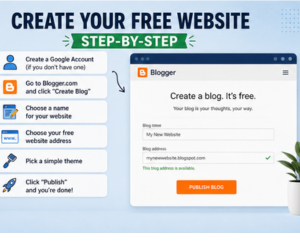
Now it’s time to build your website.
Good free options include:
- Blogger
- WordPress.com
- Medium
- Substack
For complete beginners, Blogger is one of the easiest places to start because it’s free, simple, and doesn’t require technical skills.
Creating Your Website
- Create a Google account if needed.
- Visit Blogger.
- Click Create Blog.
- Choose your website name.
- Select your free website address.
- Pick a simple theme.
- Publish your website.
Congratulations.
You now own a website.
Don’t worry if it looks basic.
A basic website with helpful content will almost always outperform a beautiful website with no content.
What Should You Name Your Website?
Many beginners get stuck here.
They spend days searching for the perfect name.
Try not to overcomplicate it.
Good website names are:
- Easy to remember
- Easy to spell
- Related to your topic
For example, if your website is about traffic generation, a name related to website traffic makes sense.
The goal isn’t to create the world’s most clever name.
The goal is to create a website people can remember.
Step 3: Create These Pages Before Writing Articles
Before publishing your first article, create these pages.
About Page
Tell visitors:
- Who you are
- Why you created the website
- What they will learn
Keep it friendly and conversational.
Contact Page
Make it easy for visitors to contact you.
Trust matters online.
Privacy Policy
Most website platforms make this easy.
This page helps build trust and is especially important if you collect email addresses.
Disclaimer
If you discuss business, marketing, finance, health, or anything involving results, a disclaimer is a smart idea.
These pages might not seem exciting, but they help make your website look professional and trustworthy.
The Secret Most New Website Owners Never Learn
Here’s something many beginners don’t realize.
The websites that get the most traffic are not usually the websites with the best design.
They’re the websites with the best content.
Content is what brings visitors.
Content is what gets shared.
Content is what ranks in Google.
Content is what builds trust.
This means your next goal isn’t making your website prettier.
Your next goal is creating helpful content that answers questions people are already searching for.
And that’s exactly what we’ll cover next.
Step 4: Publish the Right Articles First
One mistake I see new website owners make all the time is writing random articles.
They publish whatever comes to mind and hope something works.
A better approach is creating content that answers questions your audience is already asking.
Think about it this way.
Every question someone types into Google is a potential article idea.
If your website answers that question better than most other websites, you have a chance to get traffic.
The First 10 Articles I Would Publish
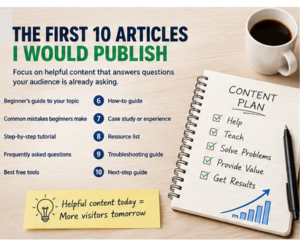
If I were starting a brand-new website today, these are the types of articles I would create first.
- Beginner’s guide to your topic
- Common mistakes beginners make
- Step-by-step tutorial
- Frequently asked questions
- Best free tools
- How-to guide
- Case study or personal experience
- Resource list
- Troubleshooting guide
- Next-step guide
For example, if your website is about website traffic, your first articles might look like this:
- How to Get Free Website Traffic
- 10 Free Ways to Drive Traffic to Your Website
- How to Build an Email List From Scratch
- How to Write Articles That Get Clicks
- Best Free Traffic Sources for Beginners
- Pinterest Traffic for Beginners
- LinkedIn Traffic Tips
- Common Website Traffic Mistakes
- How Long Does It Take to Get Traffic?
- My First 100 Visitors: What I Learned
Notice how every article connects to the others.
That’s exactly what you want.
Google likes websites that thoroughly cover a topic.
How to Find Low-Competition Keywords
A keyword is simply a phrase people search for.
For example:
- how to build a website for free
- website traffic tips
- email marketing for beginners
The easiest way to find keyword ideas is to start typing into Google.
Google will automatically suggest popular searches.
Write these ideas down.
Then look at the “People Also Ask” section.
You’ll often discover dozens of article ideas from a single search.
Don’t Chase Huge Keywords Right Away
Many beginners try to rank for extremely competitive keywords.
Examples include:
- make money online
- affiliate marketing
- website traffic
Instead, target longer phrases.
Examples:
- how to get website traffic without social media
- how to build a website for free and get visitors
- best free traffic sources for beginners
These are often easier to rank for because fewer websites target them.
How to Write Articles Google Loves
Google has one goal.
It wants to show searchers the best answer.
That means your job is simple.
Become the best answer.
Start With the Problem
Many articles jump straight into solutions.
Instead, explain the problem first.
For example:
“Many new website owners struggle to get traffic because they focus on design instead of content.”
Now readers immediately know they’re in the right place.
Give Clear Steps
Readers love step-by-step instructions.
Instead of saying:
“Promote your content.”
Say:
“Share your article on LinkedIn, create a Pinterest pin, post it in relevant Facebook groups, and add it to your email newsletter.”
Specific advice is more valuable.
Use Real Examples
Examples help readers understand concepts faster.
Whenever possible, explain what you would do personally.
This makes your content more useful and more trustworthy.
Basic On-Page SEO Made Simple
SEO can sound complicated.
The good news is that the basics are easy.
Include Your Main Keyword Naturally
Use it in:
- The title
- The first paragraph
- Two H2 headings
- The URL
- Image alt text
Don’t force it.
Write naturally.
Use Related Keywords
Google understands related terms.
For this article, related phrases might include:
- create a website
- free website builder
- website visitors
- website traffic
- beginner website guide
Using related terms helps Google understand your topic.
Make Articles Easy to Read
Use:
- Short paragraphs
- Bullet points
- Headings
- Numbered lists
Most people skim articles before reading them.
Good formatting helps keep visitors on your website longer.
Why Internal Links Matter
Internal links are links to other pages on your website.
Many website owners ignore them.
That’s a mistake.
Imagine your website is a city.
Roads connect everything together.
Internal links are those roads.
Without them, Google has a harder time understanding your content.
Example
If this article discusses traffic, you could link to:
- Your free traffic article
- Your email marketing article
- Your affiliate marketing guide
This helps both readers and search engines.
As your website grows, internal links become even more important.
Build Trust With Experience
Google wants trustworthy content.
One of the easiest ways to stand out is by sharing your own experiences.
For example:
Instead of saying:
“Building a website takes time.”
You could say:
“When I launched one of my first websites, I expected visitors within a few days. Instead, it took several weeks before Google started sending traffic. That experience taught me that patience is part of the process.”
Personal experiences help make your content unique.
No other website can copy your experiences exactly.
That’s a major advantage.
Start Building an Email List Early
Many people wait until their website gets traffic before building an email list. If you’re not sure where to begin, check out my guide on How to Build an Email List From Scratch, where I walk through the exact steps beginners can follow.
I think that’s backwards.
Start collecting subscribers as early as possible.
Even if you only get a few visitors each week, some of them may join your list.
Over time, those subscribers add up.
Offer Something Helpful
Examples include:
- Free checklist
- Free guide
- Free report
- Resource list
- Template
People are much more likely to subscribe when they receive something valuable.
30-Day Plan to Get Traffic to Your New Website
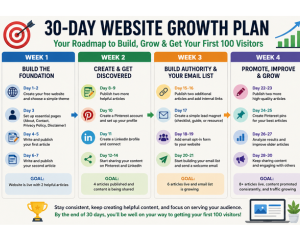
A simple 30-day plan can help you build a website, publish content, and start attracting your first visitors.If I were starting completely from scratch, here’s exactly what I would do.
Week 1
- Create website
- Publish About page
- Publish Contact page
- Write first article
- Write second article
Week 2
- Publish two more articles
- Create Pinterest account
- Create LinkedIn profile
- Start sharing content
Week 3
- Publish two additional articles
- Add internal links
- Create simple lead magnet
- Start building email list
Week 4
- Publish two more articles
- Create Pinterest pins
- Share content consistently
- Improve older articles
By the end of 30 days, you’ll have:
- A functioning website
- Several helpful articles
- Internal links
- Traffic sources
- An email list
- A strong foundation for growth
Most importantly, you’ll be far ahead of people who never get started.
What to Focus on Next
After your first month, keep repeating the process.
Create content.
Help people.
Build your email list.
Improve older articles.
Add internal links.
Promote your content.
Success rarely comes from one article.
It usually comes from dozens of helpful articles working together.
That’s how small websites grow into large websites.
And that’s how many website owners eventually reach their first 100 visitors, their first 1,000 visitors, and beyond.
Common Mistakes New Website Owners Make
If you can avoid these mistakes, you’ll save yourself a lot of time and frustration.
Mistake #1: Waiting for the Perfect Website
Many beginners spend weeks tweaking their design before publishing a single article.
The problem is that visitors don’t come because your website looks perfect.
They come because your content helps them.
A simple website with helpful articles will almost always outperform a beautiful website with no content.
Mistake #2: Publishing One Article and Quitting
One article rarely builds a successful website.
Think of each article as another opportunity to get found in Google.
The more helpful content you create, the more chances you have to attract visitors.
Mistake #3: Ignoring Email Marketing
Traffic is great.
But if visitors leave and never return, you’re constantly starting over.
Building an email list allows you to stay connected with your audience and bring visitors back to your website.
Mistake #4: Chasing Every New Trend
One week it’s TikTok.
The next week it’s Pinterest.
Then it’s something else.
Choose a strategy and stick with it long enough to see results.
Consistency beats constant switching.
Mistake #5: Giving Up Too Soon
This is probably the biggest mistake of all.
Most websites don’t get significant traffic overnight.
Many successful websites take months to gain momentum.
The people who succeed are often the people who simply keep going.
How Can You Make Money From a Website?
A lot of people ask this question after they build their first website.
The good news is that there are several ways to monetize a website.
Affiliate Marketing
This is one of the easiest methods for beginners.
You recommend products or services and earn a commission when someone makes a purchase through your link.
Display Advertising
As your traffic grows, you can place ads on your website.
You earn money when visitors view or click those ads.
Sell Digital Products
Examples include:
- Ebooks
- Checklists
- Templates
- Courses
Digital products can be created once and sold repeatedly.
Build an Email List
Many successful website owners eventually discover that their email list becomes one of their most valuable business assets.
An email list allows you to build relationships and promote future content, products, or services.
Advanced Ways to Get Traffic to a New Website
Once you’ve published several articles, here are a few additional strategies that can help.
Create Pinterest Pins
Pinterest works like a visual search engine.
Create multiple pins for each article you publish.
Different designs can attract different audiences.
Share Content on LinkedIn
Many website owners completely ignore LinkedIn.
That’s a mistake.
Helpful articles often perform well there, especially if you explain what readers will learn.
Update Older Articles
Many people only focus on creating new content.
Sometimes updating an older article can produce better results.
Add:
- New information
- Better examples
- Additional images
- Frequently asked questions
Google likes fresh, helpful content.
Answer Questions Online
Look for places where people are already asking questions related to your niche.
Provide helpful answers and point people toward your content when appropriate.
The goal is always to help first.
How Long Does It Take to Get 100 Visitors?
This is probably the most common question beginners ask.
The answer depends on several factors:
- Your niche
- Content quality
- Competition
- Consistency
- Promotion efforts
Some websites get their first 100 visitors within a few weeks.
Others take several months.
The important thing is not comparing yourself to other people.
Focus on improving your website one article at a time.
Traffic often grows slowly at first and then accelerates as your content library expands.
How to Build a Website for Free and Get Traffic: Quick Summary
Let’s quickly recap the process.
Step 1
Choose a topic you can write about consistently.
Step 2
Create your free website.
Step 3
Set up your About, Contact, Privacy Policy, and Disclaimer pages.
Step 4
Publish helpful content that solves real problems.
Step 5
Learn basic SEO.
Step 6
Link your articles together.
Step 7
Build an email list.
Step 8
Share your content on platforms like Pinterest and LinkedIn.
Step 9
Continue publishing new articles.
Step 10
Stay consistent and keep improving.
Follow these steps and you’ll be ahead of most people who start a website.
Frequently Asked Questions
Can I Build a Website for Free?
Yes.
Several platforms allow you to build a website at no cost, including Blogger, WordPress.com, Medium, and Substack.
Do I Need to Know How to Code?
No.
Most website builders are designed for beginners and require little to no coding knowledge.
How Many Articles Should I Publish?
A good goal is one to two articles per week.
The more helpful content you publish, the more opportunities you have to attract visitors.
How Long Does SEO Take?
SEO is usually a long-term strategy.
Some articles may rank within weeks, while others can take several months.
Is a Free Website Good Enough?
For beginners, yes.
A free website is a great way to learn, gain experience, and start building an audience.
You can always upgrade later.
Should I Focus on Traffic or Design?
Traffic.
A simple website with excellent content will usually outperform a beautiful website with weak content.
Can I Make Money From a Free Website?
Yes.
Many people use free websites to promote affiliate products, build email lists, and grow an online business.
Final Thoughts
If you’re waiting for the perfect time to start a website, stop waiting.
The best time to start is now.
You don’t need expensive tools.
You don’t need technical skills.
You don’t need hundreds of articles.
You simply need to begin.
Choose a topic.
Create your website.
Publish helpful content.
Learn basic SEO.
Build an email list.
Keep showing up.
Most successful websites weren’t built in a weekend.
They were built one article at a time.
The sooner you start, the sooner Google can discover your content, visitors can find your website, and your online presence can begin to grow.
Your first website probably won’t be perfect.
Mine certainly wasn’t.
But every successful website starts the same way:
With a single page, a single article, and a decision to begin.
Now it’s your turn.
Learning how to build a website for free and get traffic isn’t complicated, but it does require consistency.